Budget Tracker
Catch a division drifting early
A budget that only gets checked at the end is a report, not a control. PreConstruct tracks budget against actual cost by division while the job is running, so a division drifting shows up early.
Already a customer? Log in
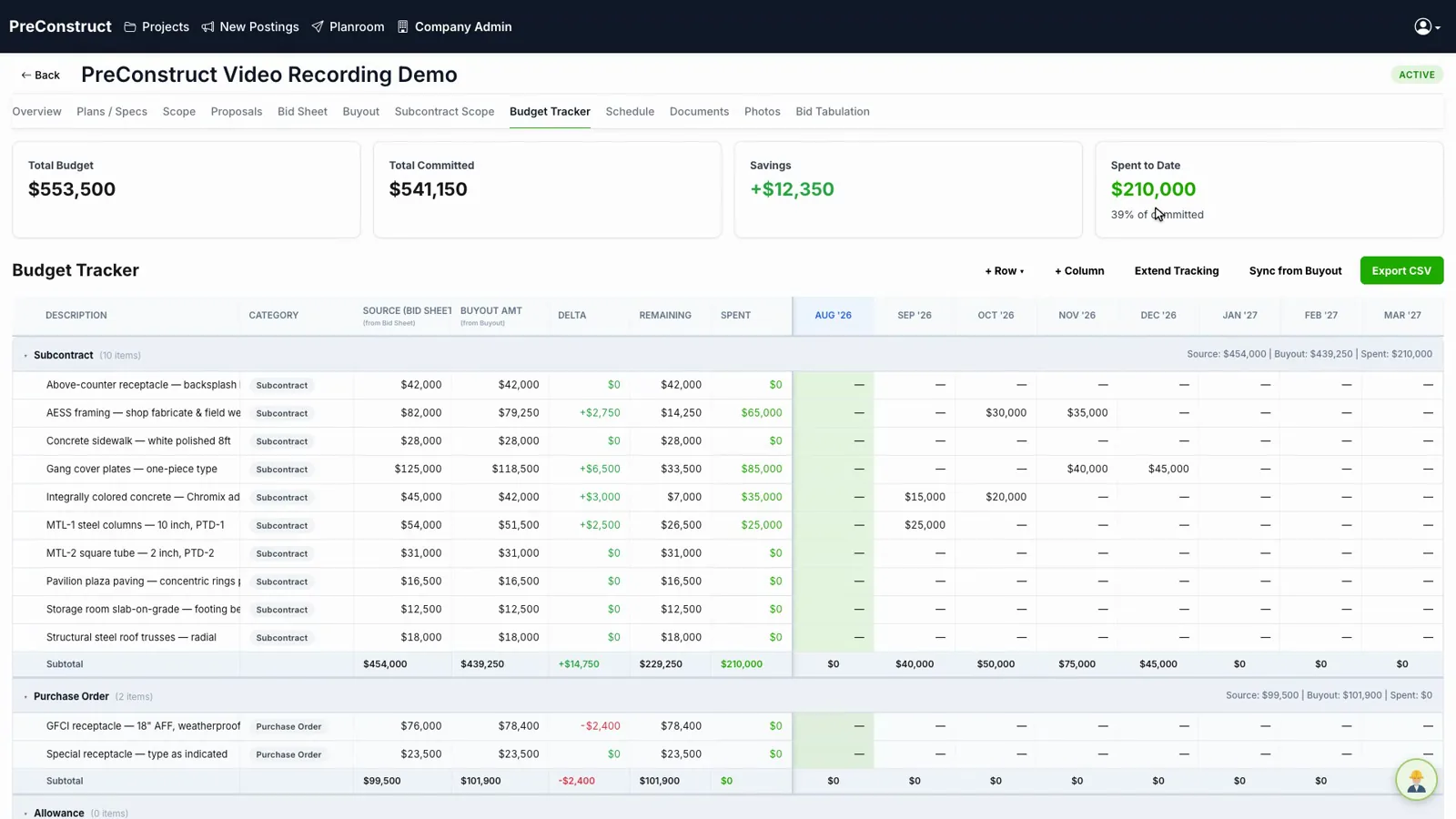 Budget, committed, spent
How it works
- 1Start from the estimate as the budget baseline.
- 2Record actual costs against each division.
- 3See variance by division rather than one number for the job.
- 4Extend tracking as the job runs past its original end date.
What you get
- Budget versus actual by CSI division
- Variance visible per division, not just in total
- Columns you can resize and add
- Tracking that extends when the schedule does
Common questions
Where does the budget come from?
The estimate becomes the baseline, so you are not typing the budget a second time.
Can I add my own columns?
Yes. Columns can be added and resized.
What does extending tracking mean?
Jobs run past their planned end date. Extending tracking pushes the tracking period out so the budget keeps being recorded instead of stopping.
Is this the same as job cost accounting?
No. This tracks budget against actual cost for preconstruction and early job control. It is not an accounting ledger.
Related
See it on one of your own bids
We will walk through the platform using a project like the ones you bid, not a canned sample.
Or email contact@preconstruct.ai