Buyout
Nothing awarded goes unbought
Buyout is the gap between winning the job and having every trade under contract. The risk is scope that nobody owns — awarded in the estimate but never written into a subcontract. PreConstruct tracks what is bought and what is still open.
Already a customer? Log in
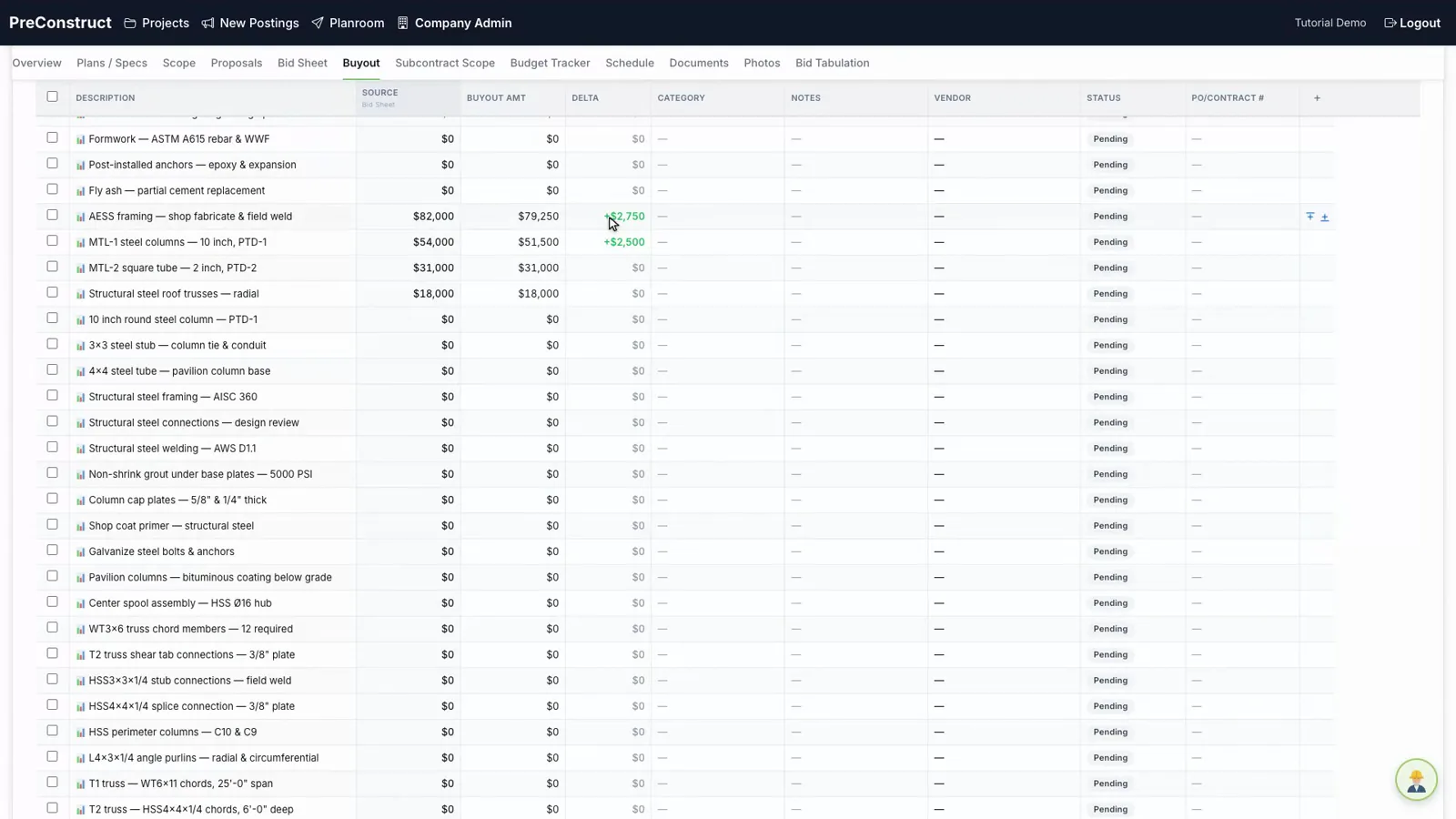 Bought vs open, by line
How it works
- 1Bring the awarded scope across from the bid.
- 2Assign each item to a subcontractor.
- 3Track which items are contracted and which are still open.
- 4Watch the buyout total against the estimate as the job moves.
What you get
- Awarded scope carried through instead of retyped
- Bought versus open visible by division
- Bulk editing for items that move together
- Buyout total tracked against the estimate
Common questions
What is construction buyout?
Buyout is the process of turning the scope you estimated into signed subcontracts and purchase orders after the job is won.
How do I find scope nobody has been assigned?
Items without a subcontractor show as open, grouped by division.
Does buyout connect to the estimate?
Yes. Awarded scope carries through so the buyout total can be compared against what was estimated.
Can I edit many items at once?
Yes. Items can be selected and edited or removed in bulk.
Related
See it on one of your own bids
We will walk through the platform using a project like the ones you bid, not a canned sample.
Or email contact@preconstruct.ai